Programs are automatically assigned to a task when you create a project, or they can be assigned afterwards via the task list.
In the procedure below, the program is controlled cyclically and is therefore assigned to a program task.-
SFC programs (SFC POUs) must always be entered one after the other in the task list. No other POU types are allowed between them.
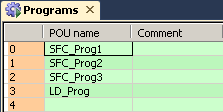
-
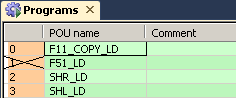
To deactivate/activate a program within a task for code generation, select the program and then or use the context menu.
To view the task properties, use or <Alt>+<Return>. The dialog contains the following items:
-
Event
This field displays the event assigned to the task (or TRUE with cyclic processing). The event is directly linked to the task.
-
Interval
For time-driven tasks (periodic interrupts), this field displays the interval after which the POU is reloaded. You can change the interval by entering a time value.
NOTEThe interval must be entered in IEC format: e.g.: T#10s
-
Priority
In Control FPWIN Pro7, the priority for all tasks is fixed at 31 and cannot be changed. Interrupt tasks are processed in the order displayed in the task list, i.e. interrupt 0 has a higher priority than interrupt 1, etc.