


 Unit_AnalogInOut_FP0_A21
Function to write to and read from an FP0-A21 unit.
This function writes digital data to the analog output channel of the analog unit and reads converted digital data from its analog input channels. The digital values to be converted and output as analog values are specified at iOutChannel. The converted digital values from the analog unit are stored per channel in the output variables iInChannel0 and iInChannel1.
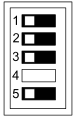
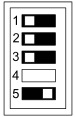
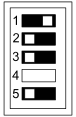
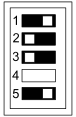
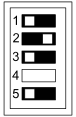
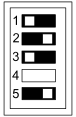
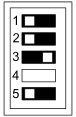
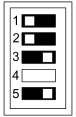
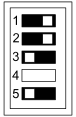
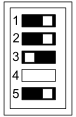
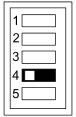
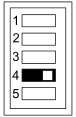
The analog value ranges must be set with the DIP switches.
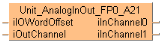
Input
Set the offset of the first WX/WY address of the analog unit according to its installation position.
For analog expansion units connected directly to the CPU (without adapter): Use ExpansionUnitToIOWordOffset_FP0 or make the following settings: 2 (WX2/WY2) for unit number 1, 4 (WX4/WY4) for unit number 2, 6 (WX6/WY6) for unit number 3
For analog expansion units connected to the CPU via an adapter: Use ExpansionUnitToIOWordOffset_FPX_FP0 or select the offset from the table.
Unit position relative to the adapter |
Adapter position relative to the CPU |
|||||||
|---|---|---|---|---|---|---|---|---|
1st unit |
2nd unit |
3rd unit |
4th unit |
5th unit |
6th unit |
7th unit |
8th unit |
|
1st unit |
30 |
40 |
50 |
60 |
70 |
80 |
90 |
100 |
2nd unit |
32 |
42 |
52 |
62 |
72 |
82 |
92 |
102 |
3rd unit |
34 |
44 |
54 |
64 |
74 |
84 |
94 |
104 |
Set the digital value to be converted and output by the analog unit.
Output
Returns the converted digital data from the analog unit by channel.
The DIP switch settings will become effective when the power is turned from OFF to ON.
No averaging: Conversion data is set for the specified input contact point area for each A/D conversion, on each channel.
Averaging: On each channel, for each A/D conversion, the maximum and minimum values from the data of the last ten times are excluded, the data from the other eight times is averaged and the result is set.
0 to 5V, 0 to 20mA |
-10 to +10V |
|||
|---|---|---|---|---|
No averaging |
Averaging |
No averaging |
Averaging |
|
 |
 |
 |
 |
 |
For thermocouples, averaging is always performed.
Terminal temperature to 1000°C |
-100°C to terminal temperature |
|
|---|---|---|
|
 |
 |
Terminal temperature to 750°C |
-100°C to terminal temperature |
|
|---|---|---|
|
 |
 |
Terminal temperature to 350°C |
-100°C to terminal temperature |
|
|---|---|---|
|
 |
 |
0 to 20mA |
-10 to +10V |
|
|---|---|---|
|
 |
 |
Voltage input |
Current input |
|---|---|
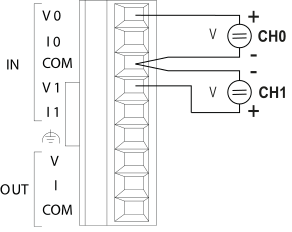 Connect the input instrument between the IN/V and IN/COM terminals. |
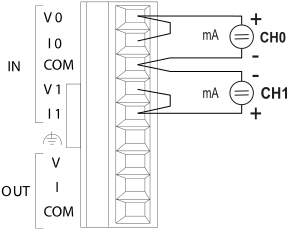 Connect the IN/V and IN/I terminals. Connect the input instrument between the bridge and the IN/COM terminal. |
Thermocouple input |
|
|---|---|
Temperature higher than terminal temperature: 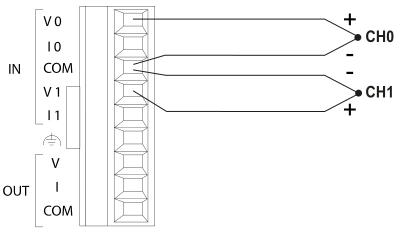 Connect the IN/V terminal to the (+) side of the thermocouple. Connect the IN/COM terminal to the (-) side of the thermocouple. |
Temperature lower than terminal temperature: 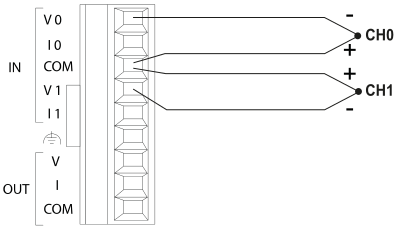 Connect the IN/V terminal to the (-) side of the thermocouple. Connect the IN/COM terminal to the (+) side of the thermocouple. |
Voltage output |
Current output |
|---|---|
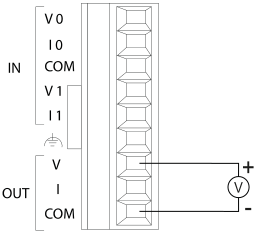 Connect the output instrument between the OUT/V and OUT/COM terminals. |
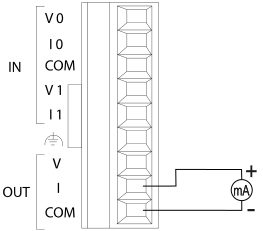 Connect the output instrument between the OUT/I and OUT/COM terminals. |
0mA to 20mA input or output |
0V to 5V DC input |
-10V to 10V DC input or output |
|||
|---|---|---|---|---|---|
Digital value (INT) |
Analog value |
Digital value (INT) |
Analog value |
Digital value (INT) |
Analog value |
0 |
0.0mA |
0 |
0.0V |
-2000 |
-10.0V |
800 |
4.0mA |
400 |
0.5V |
-1500 |
-7.5V |
1600 |
8.0mA |
800 |
1.0V |
-1000 |
-5.0V |
2400 |
12.0mA |
1200 |
1.5V |
-500 |
-2.5V |
3200 |
16.0mA |
1600 |
2.0V |
0 |
0.0V |
4000 |
20.0mA |
2000 |
2.5V |
+500 |
+2.5V |
2400 |
3.0V |
+1000 |
+5.0V |
||
2800 |
3.5V |
+1500 |
+7.5V |
||
3200 |
4.0V |
+2000 |
+10.0V |
||
3600 |
4.5V |
||||
4000 |
5.0V |
||||
Thermocouple input:
Above terminal temperature |
Below terminal temperature |
||
|---|---|---|---|
Digital value (INT) |
Analog value |
Digital value (INT) |
Analog value |
25 |
25°C |
0 |
0°C |
250 |
250°C |
-25 |
-25°C |
350 |
350°C |
-50 |
-50°C |
500 |
500°C |
-75 |
-75°C |
750 |
750°C |
-100 |
-100°C |
1000 |
1000°C |
||
This command description provides basic hardware documentation only. For detailed technical information, consult the manual:

All input and output variables used for programming this function have been declared in the POU header. The same POU header is used for all programming languages.
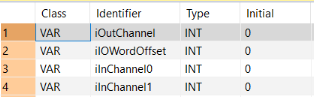
	VAR
		iOutChannel: INT:=0;
		iIOWordOffset: INT:=0;
		iInChannel0: INT:=0;
		iInChannel1: INT:=0;
END_VARUse ExpansionUnitNumberToIOWordOffset_FP0 or ExpansionUnitNumberToIOWordOffset_FPX_FP0 to calculate the word offset of the analog unit connected to the CPU.

BODY
    WORKSPACE
        NETWORK_LIST_TYPE := NWTYPELD ;
        ACTIVE_NETWORK := 0 ;
    END_WORKSPACE
    NET_WORK
        NETWORK_TYPE := NWTYPELD ;
        NETWORK_LABEL :=  ;
        NETWORK_TITLE :=  ;
        NETWORK_HEIGHT := 5 ;
        NETWORK_BODY
B(B_F,Unit_AnalogInOut_FP0_A21!,,25,1,38,5,,?DiIOWordOffset?DiOutChannel?CiInChannel0?CiInChannel1);
B(B_VARIN,,iOutChannel,23,3,25,5,);
B(B_VAROUT,,iInChannel0,38,2,40,4,);
B(B_VAROUT,,iInChannel1,38,3,40,5,);
B(B_VARIN,,1,3,2,5,4,);
B(B_F,ExpansionUnitNumberToIOWordOffset_FP0!,,5,1,25,4,,?DiExpansionUnitNumber?C);
L(1,0,1,5);
        END_NETWORK_BODY
    END_NET_WORK
END_BODYUnit_AnalogInOut_FP0_A21(iIOWordOffset := iIOWordOffset,
iOutChannel := iOutChannel,
iInChannel0 => iInChannel0,
iInChannel1 => iInChannel1);